Our Location
5th Floor, Huake Center, Lanshan District, Linyi City, Shandong Province, China

5th Floor, Huake Center, Lanshan District, Linyi City, Shandong Province, China
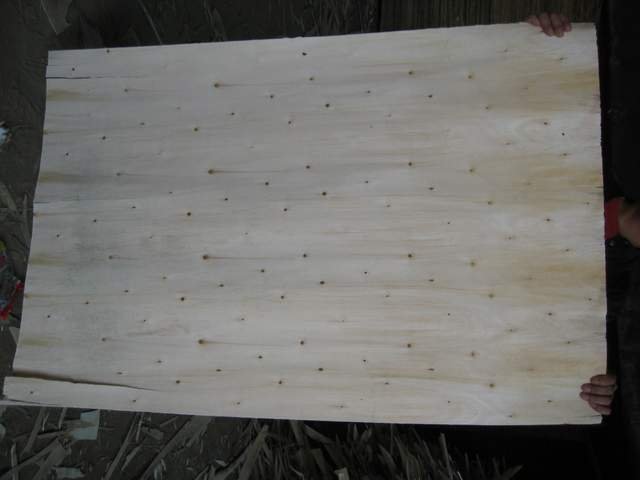
Plywood for laser cutting is a thin panel that a laser cutter or engraver cuts into shapes, letters, and models. The laser gives a clean, precise cut that a saw cannot match for small, detailed parts, and plywood is one of the most common materials for the job.
The key to clean laser cuts in plywood is the right thickness, the right grade, and the right settings. A panel that is too thick burns or chars, while a panel that is too thin warps, and a wrong setting leaves a scorched edge.
Plywood cuts cleanly with a laser because the thin veneer and the glue line respond to the beam, and the panel is flat and stable. The laser gives a precise, repeatable cut that suits models, signs, and small parts.
The layered construction of plywood is both a benefit and a challenge. The layers cut evenly, but the glue line can scorch if the power is too high or the speed is too slow. The maker tunes the settings to the panel.
Plywood is also cheaper and more available than many laser-friendly materials, so a maker can prototype and produce in plywood at a low cost. That availability is a big part of its appeal.
The precision of a laser cut is a major advantage for small parts, because the beam cuts fine detail that a saw cannot reach. A model, a sign, or a small mechanical part benefits from the precision.
The cost and availability of plywood make it easy to test and to produce, because a maker can buy a thin sheet and cut many parts from it. A cheap panel lowers the risk of a new design.
The thickness follows the part. A thin panel of 3 mm suits small parts, signs, and models, while a 4 mm or a 6 mm panel suits thicker parts and stronger assemblies. The maker matches the thickness to the part and the laser’s power.
The laser’s power sets the maximum thickness it can cut cleanly. A low-power laser cuts thin panels well but struggles with thick ones, while a higher-power laser cuts thicker panels but needs a slower speed.
The maker tests the panel at the chosen thickness before cutting the final parts, because the settings that cut one panel cleanly may scorch another. A test cut avoids wasted parts.
A 3 mm panel cuts fast and clean and suits detailed work, but it is flexible and needs support in the assembly. A 6 mm panel is sturdier and suits parts that carry load, but it needs more power and a slower speed.
The maker chooses the thickness by the part’s strength and the detail, because a part that is too thin flexes and a part that is too thick is slow and costly to cut.
Choose a plywood with a sound, consistent core and a clean face, because a panel with voids or a rough face cuts unevenly and leaves a scorched edge. A good panel gives a clean cut and a smooth edge.
The face veneer should be thin and consistent, because a thick or a coarse face can scorch and chip at the cut. A fine, tight veneer cuts cleanly and engraves well.
Avoid panels with heavy glue lines or a treated surface, because the glue and the treatment can produce fumes and a scorched edge. A clean, untreated panel cuts best.
The face veneer sets the cut quality, so a fine, tight veneer is the best choice. The core should be consistent and void-free, because a void can cause a rough cut or a break.
The glue line should be thin and even, because a thick or a heavy glue line scorches and leaves a dark edge. A clean, thin glue line cuts more cleanly.
The settings follow the panel and the machine. The power, the speed, and the number of passes control the cut, and the maker tunes them to the panel. A higher power cuts thicker panels, while a higher speed reduces the burning.
Air assist helps clear the smoke and the debris from the cut, which reduces the scorching and gives a cleaner edge. A good air assist is essential for a clean cut in plywood.
Test cuts on a scrap panel of the same type, because the settings that cut one panel cleanly may scorch another. A test grid of power and speed finds the best setting.
The power sets how deeply the beam cuts, and the speed sets how long the beam dwells on the material. A slow speed with high power cuts thick panels but risks burning, while a fast speed with low power reduces the burning but may not cut through.
Air assist blows the smoke and the debris away from the cut, which keeps the beam clean and the edge sharp. A maker who uses air assist gets a cleaner cut and less scorching.
Clean the cut edge of the soot and the char before finishing, because a scorched edge shows through a finish and can bleed into the surrounding material. A light sand or a wipe with a cloth removes the surface char.
Finish the cut parts with a clear coat, a paint, or an oil, because the laser leaves the edge exposed and the finish protects it. A sealed edge resists the moisture that would swell the panel.
Handle the thin parts carefully, because a laser-cut panel is delicate at the edges and a knock can chip the cut. A careful handling keeps the parts sound.
Sand the cut edge lightly to remove the char and to smooth the edge, because a clean edge takes the finish evenly. A light sand avoids rounding the sharp detail.
Seal the edges and the faces with a clear coat or an oil, because the laser exposes the core at the cut and the finish protects it. A sealed part lasts longer and looks better.
Laser cutting plywood produces smoke and fumes from the wood and the glue, so the work needs good ventilation or a filtration system. The fumes are a health hazard, and the maker must extract them.
Never cut a treated or a coated panel in a laser, because the treatment and the coating release toxic fumes. A clean, untreated plywood is the safe choice.
Watch the cut for flames, because plywood can ignite if the power is too high or the speed is too slow. A fire watch and a fire extinguisher are essential when laser cutting.
Extract the fumes with a good ventilation system, because the smoke from the wood and the glue is harmful to breathe. A filtered extractor protects the maker and the machine.
Use only clean, untreated plywood, because a treated or a coated panel releases toxic fumes and can damage the machine. A clean panel is the safe and the reliable choice.
The right panel depends on the job. Commercial Plywood serves general construction and furniture, while Melamine Plywood suits a painted or a casual build. MDF Board gives a smooth core for a painted or a laminated part, Film Faced Plywood suits a tough shop panel, and Chip Board covers a budget prototype.
Suppliers such as HYY list the grade, the thickness, and the core on the contract, so the buyer can order a panel that suits the laser and the job.
Design the parts with the laser in mind, because the beam has a kerf that affects the fit. A maker adds a small clearance to the joints so the parts fit together after the cut.
Group the parts on the panel to reduce waste, because a well-nested layout cuts more parts from one sheet. A nested layout lowers the cost per part.
What plywood is best for laser cutting? A thin panel with a fine, consistent veneer and a clean, void-free core cuts cleanly, while a treated or a heavy-glue panel scorches and fumes.
What thickness of plywood can a laser cut? It depends on the laser’s power, but a low-power laser cuts 3 mm well, and a higher-power laser cuts 6 mm or more with the right settings.
How do you stop a laser burning plywood? Reduce the power, increase the speed, use air assist, and test on a scrap panel to find the setting that cuts through without scorching.
Can you engrave plywood with a laser? Yes, a laser engraves the face veneer with text, logos, and patterns, and the fine veneer takes a clean, detailed engraving.
Is laser cutting plywood safe? With good ventilation and clean, untreated plywood, yes. The fumes and the fire risk must be managed with an extractor and a fire watch.